概述 : R800ZZ WebXR PMX+VRM ViewerEnglish
Русский
Español
ภาษาไทย
中文
한국어
日本語
vr180g.com
2026年8月12日更新
免费的VR网络应用程序
R800ZZ WebXR PMX+VRM Viewer
3D 头像查看器、3DCG 视频制作软件、VRM→ PMX 转换器
- 开发者 : R800ZZ
- 支持的设备 (XR/VR) : VR HMD(PICO 4 Ultra+PICO Browser,PICO 4+PICO Brower,Meta Quest 3+Meta Browser,PC+SteamVR+Edge/Chrome/Chromium)
- 运行环境 (WebGL) : 网页浏览器 , 支持CPU内置GPU。(例如:Intel UHD Graphics 630)
- 视频文件创建要求 : 需要在桌面操作系统上使用 Chrome/Edge/Chromium。不支持 Firefox,不支持移动操作系统。
必须使用 ffmpeg。
- 价格 : 免费
- 支持的头像 : PMX(.pmx 头像 / 舞台),PMD(.pmd),BPMX(.bpmx)
VRM 0.x(.vrm),VRM 1.0(.vrm)
PMX文件不包含纹理图像。
网页浏览器在选择多个文件的方式上有一定限制。
三选
1.选择文件夹。(仅限桌面操作系统。)
2.将PMX和纹理图像打包到ZIP文件中。
3.将PMX和纹理打包到BPMX文件中。
PMX to BPMX Converter(转换=仅限桌面操作系统。)
相似的姊妹软件(由同一作者开发) : R800ZZ WebXR VRM Viewer
- 支持的动作 : VMD (*.vmd 头像 / 摄像机)
- 舞台(.pmx)
- 摄像机(.vmd)
- .mp3 , .wav
- 360°全景图(背景)
- 普通图片(背景)
- 支持的语言 : 中文、英语、俄语、西班牙语、泰语、韩语、日语
- 左控制器和右控制器的操作方法相同。 ?
"AR" : VR的透视(Passthrough) (Wolvik 不支持 )
"VR" : VR
握把按钮+移动(上下/左右)(Grip move) : 玩家 移动
拇指杆键+上下/左右 : 旋转
- 6DoF : 你可以在虚拟现实空间中自由移动。
- 内置动作 : by R800ZZ , 这些是使用 PICO Motion Tracker 进行动作捕捉的。
软件 : R800ZZ Motion Capture
- 简易物理设置
VRM → PMX 转换功能
勾选复选框 "VRM to PMX converter",加载 VRM 文件后将输出 PMX 文件。
此软件在本地进行转换。
此软件不会将文件发送到外部服务器。
在加载 VRM 文件后,您可以立即检查转换后 PMX 角色的质量,包括表情、物理和动作。
我已尽力使其能够读取尽可能多的 VRM。
已知问题:VRM 1.0 的肘部。
・VRM 1.0 转换错误(已修复)
・VRoid 的眼镜未变为透明(已修复)
・特定模型的颜色不同(已修复)
・其他转换错误(发现的错误已修复)。
VR180 SBS (2 Cameras / 12 Cameras) : 视频文件创建
必须使用 ffmpeg。
使用 cmd.exe 自动生成 .bat 文件
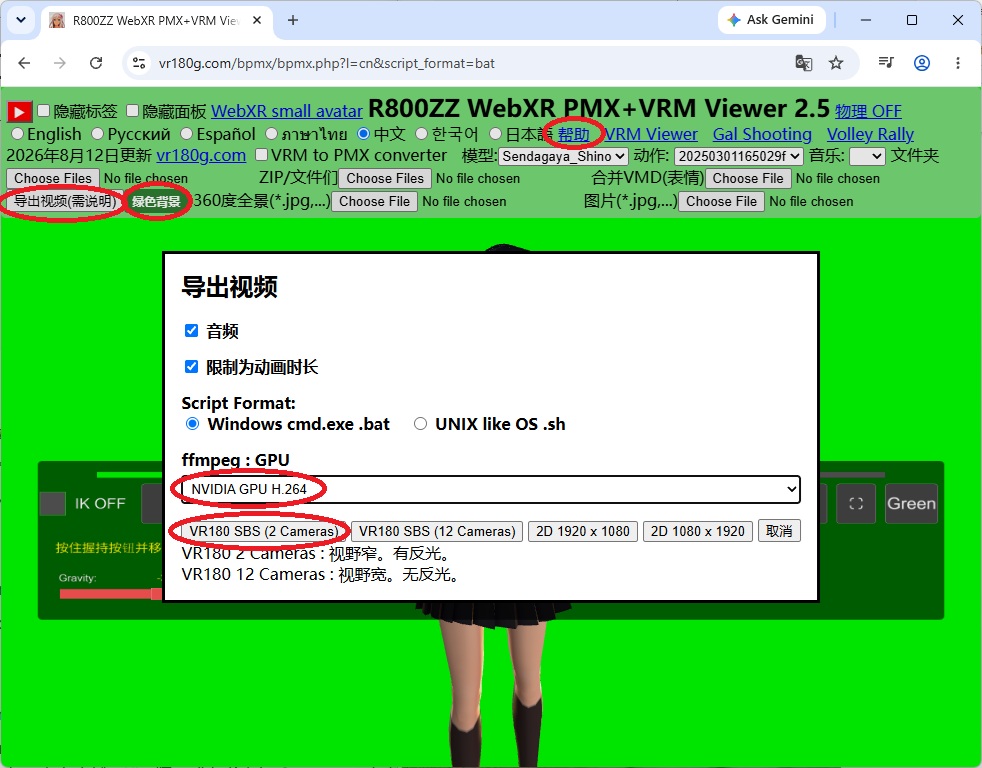
2D : 视频文件创建
需要 ffmpeg 或替代软件来连接连续的图像文件。
使用 cmd.exe 自动生成 .bat 文件
H.264(-c:v libx264)ffmpeg -framerate 30 -i frame_%05d.jpg -c:v libx264 -pix_fmt yuv420p output.mp4
NVIDIA GPU + H.265(-c:v hevc_nvenc)ffmpeg -framerate 30 -i frame_%05d.jpg -c:v hevc_nvenc -pix_fmt yuv420p output.mp4
将连续的图像文件连接起来以创建MP4视频文件。
在批处理文件 (.bat) 中,必须将"%"替换为"%%"。
H.264(-c:v libx264)ffmpeg -framerate 30 -i frame_%05d.jpg -i input.mp3 -c:v libx264 -pix_fmt yuv420p output.mp4
NVIDIA GPU + H.265(-c:v hevc_nvenc)ffmpeg -framerate 30 -i frame_%05d.jpg -i input.mp3 -c:v hevc_nvenc -pix_fmt yuv420p output.mp4
连接连续的图像文件 + 添加音频文件。
在批处理文件 (.bat) 中,必须将"%"替换为"%%"。
Tips ffmpeg
R800ZZ WebXR VRM Viewer
WebXR Unity,Ayame no meaning
软件:
babylon.js,
babylon-mmd, PHP
vr180g.com